HTML/CSS 101
HTML, CSS, and JavaScript are the bedrock foundations on which the world wide web (and therefore most digital humanities projects) are based.
- HTML provides the basic structural markup that tells your browser what to do with the information on your page.
- CSS dresses up your plain content in fancy clothes, by adding styling and layout.
- JavaScript drives the behaviors of most websites. That is, the interactions and reactions we have come to expect from the modern web.
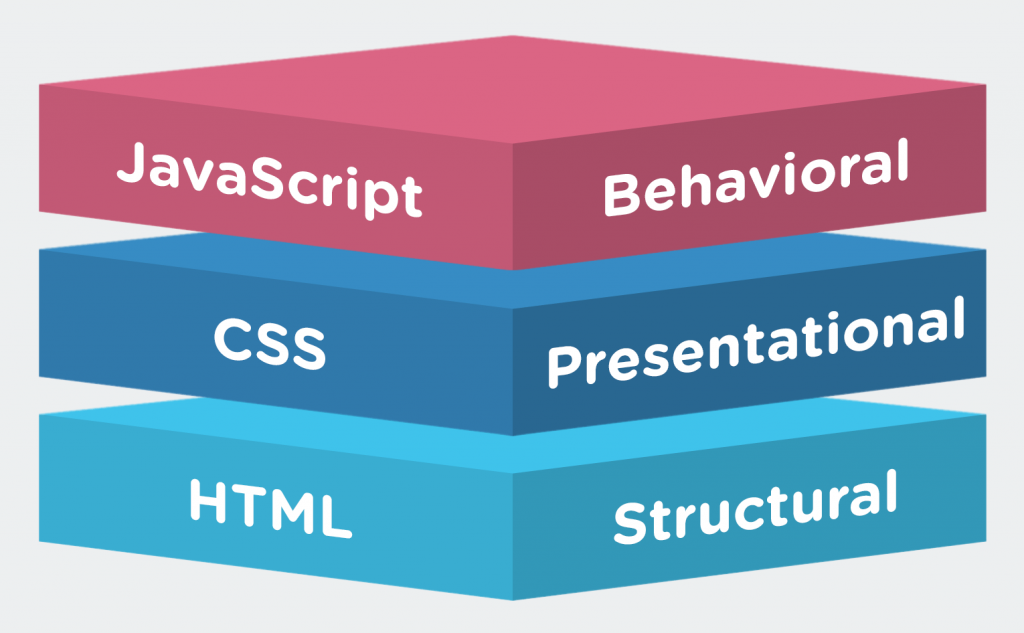
These rules are not hard and fast and there is some overlap. HTML5 has now added semantic elements that describe portions of a page rather than just creating buckets to hold content, and in the early days, HTML offered rudimentary styling and layout support as well. But Cascading Style Sheets, i.e. CSS, offers a much superior method of making all the different elements of your pages look exactly how you want them to look, and go exactly where you want them to go. The biggest benefit of style sheets is that one sheet can influence the appearance of an infinite number of pages, allowing you to update code in only one place to change anything from the color of text to the positioning of an element.
In Class: Hacking with jsBin

To get the hang of how these three languages fit together we are going to explore some examples I set up in jsBin. This code sharing site is a fantastic tool in the hacker’s toolbox, since it lets you copy and edit code in the cloud without having to invest in your own setup or FTP files to a server, view the output live, and then share all of it with others really easily. We’ll be making a lot of use of jsBin in this class (or you could use similar sites like Codepen, jsFiddle, Glitch, etc.), so get used to the interface.
The first example is basic, and will let you test out what each of our three major client side languages does, and hack away to make modifications.
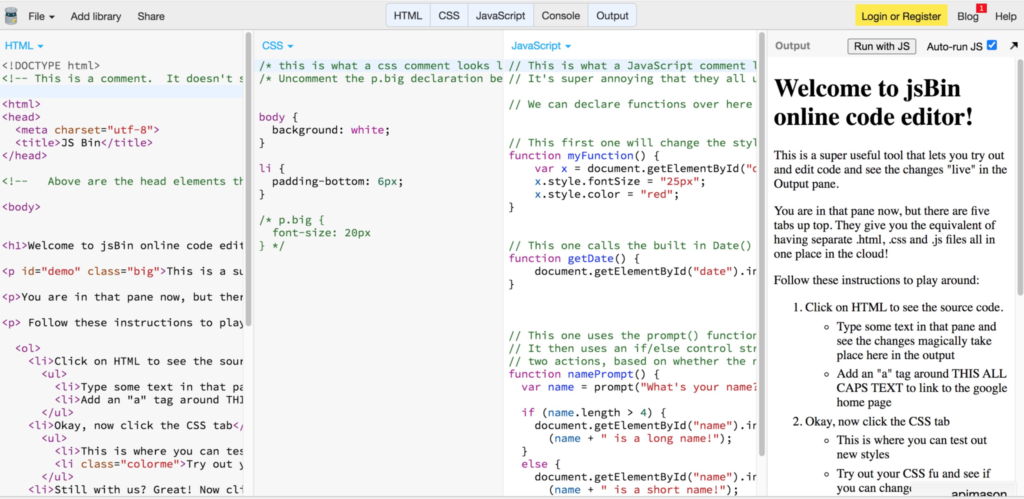
Go to http://jsbin.com/busimo/edit?output, follow the instructions, and start hacking.
JavaScript
JavaScript is the lingua franca of the modern responsive web, and almost all the pages you interact with online use it in some form or other. As with the other things we’re learning in this class, our aim is not to memorize every aspect of the language and become experts overnight, but to gain enough understanding of what it is and how it works so that we can ask the right questions when conceiving our own projects and can intelligently leverage the hard work of people who know these things much better than we do. Thank heavens for JavaScript libraries.
One of these is the Google code-prettify.js library, which is in use on this site and is what makes all of your code examples look nice!
Julie Meloni has written several how-to guides for programming, and has very helpfully posted two gentle introductory lectures pitched at Digital Humanists on Slide Share. We covered some of this material in class, but here are the full lectures to peruse at your leisure.
In Class: More hacking with jsBin
We’re going to start by returning to our jsBin example and hack on the JS there to see if we can make changes.
Go to http://jsbin.com/busimo/edit?output, follow the instructions.
In Class: DevTools
In class, we will work together to try out the rudiments of HTML and CSS, and by using the inspector tool built into modern browsers.
We are are going to use the Chrome browser for this today, since the DevTools in Chrome are a very useful tool for web development.
- DevTools for Beginners: Get Started with HTML and the DOM
- DevTools For Beginners: Get Started with CSS
If you regularly use a different browser you can also checkout the comparable tools for Firefox and Apple’s Safari, but I would recommend reducing confusion by sticking with Chrome’s until you get the hang of it before figuring out how others differ.
Lab Assignment (due Sunday)
There are many excellent resources for learning the fundamentals of web development. If you want to build pages from scratch from the ground up, pick your favorite code school or tutorial series from the resources section below and go crazy. In this course, however, we are primarily hacking and modifying other people’s code for our own purposes, rather than building from scratch, so we will keep it simple.
Your assignment is to complete two tutorials on HTML Dog.
- Take two courses, on 2 out of 3 of
- HTML,
- CSS,
- JavaScript
Many of you already have some HTML experience, and a few already have CSS or JavaScript experience. If you’re an experienced user, chose a lesson further down the list and challenge yourself. If you’re new to web development start near the top with the beginner courses.
Then, write a brief post that reflects on your experience with coding so far, and engage in the debate within the DH community over whether or not humanities students should learn to code. Your post should include the following:
- A clear statement in the first paragraph of your position either for, against, or rejecting the premise.
- At least one quotation from the assigned readings: Kirschenbaum for, or Donahue against.
- A discussion of your prior coding experience
- Include at least one code sample in your post that supports your position, by using the CODE block, which wraps the code in PRE tags.
Resources
HTML CHEAT SHEET
All the most commonly used tags, courtesy of A Simple Guide to HTML
Here are some places to go for more information If you need a refresher on the tools we used in class
- A quick rundown on the basics of the fantastically useful Digital Color Meter for Mac OS X, which lets you grab precise colors from images to use in your CSS.
There are LOTS of places to learn coding on the web for free. Here are a few further HTML/CSS resources:
- w3schools.com is one of the most comprehensive sites around, with many excellent lessons and a handy “TryIt” tool that lets you see your code in action.
- HTML Dog have several minimal example pages for specific effects you might want to achieve.
- A handy list of the most common HTML elements to familiarize yourself with at ReWritables.net.
- Since Carleton has an institutional subscription, you can also check out the HTML and CSS video tutorials on Lynda.com if you’re hungry for more.
- A straightforward HTML assignment of constructing your first page from the ground up from the folks at UCLA’s Digital Humanities 101 course.
If you find another that’s helpful, pass it along in your blog post.
bold
italic
This lab is cool
hello worldhello wordpressItalics
also does italics
I hope this makes it bold
striketesting
testing testing
bold
testOoga booga not a virus
Hello, my
nameis Nora .This is a comment on this lab .
This is a test comment. I have never really used HTML tags before, but I think they are pretty interesting.
I think there is a lot more for me to learn though.click me!
This is a strong line of code!This is an italicized word and this
wordis crossed out.title=”Important DGAH info”
This is a paragraph with lots of good info about DGAH. Will this comment post in HTML or text?
Amazon has good saucer chairs for your dorm room
I LOVEName of the Wind.
This is my lab from last week.
bold text
line text line textjriwgbeibinandiiwuefhigneiunitniu hopefully this one worksHello There
This takes me back to my childhood
Hello
check this outclick on this link: link