This week we spent time exploring photogrammetry and how it can be used to easily create a 3D model. One of the projects that I found most interesting was at the Smithsonian. One of the collections included prehistoric artifacts which took objects and figurines from 10000 years ago and creates 3D models of what they look like. It is fascinating seeing how much of the object can be restored from so long ago and having it as a 3D model allows us to interact with all sides of the object without fear of damaging it. Logistically, in museum collections it would not be possible for the visitor to interact with the collection, especially with objects from such a long time ago considering that they are fragile.

Something I didn’t even think about but learned from their website is that the collections they have physically in the exhibition are only 1% of everything the institute has, so digitization allows them to display a lot more than they can in person. This invites more people to take interest in the collections to find their niche interests modeled in the online versions, even if it are not present in-person year-round. There is also a closer attention to detail when looking at the 3D modeled version of the object because of the flexibility to look at different angles of the objects. For example, in the National Park Service Paleobiology collection there is a Stylemys nebrascensis Leidy object that is worn on the side with two holes near the bottom. This would be harder to spot, if at all, while looking at this object in person.
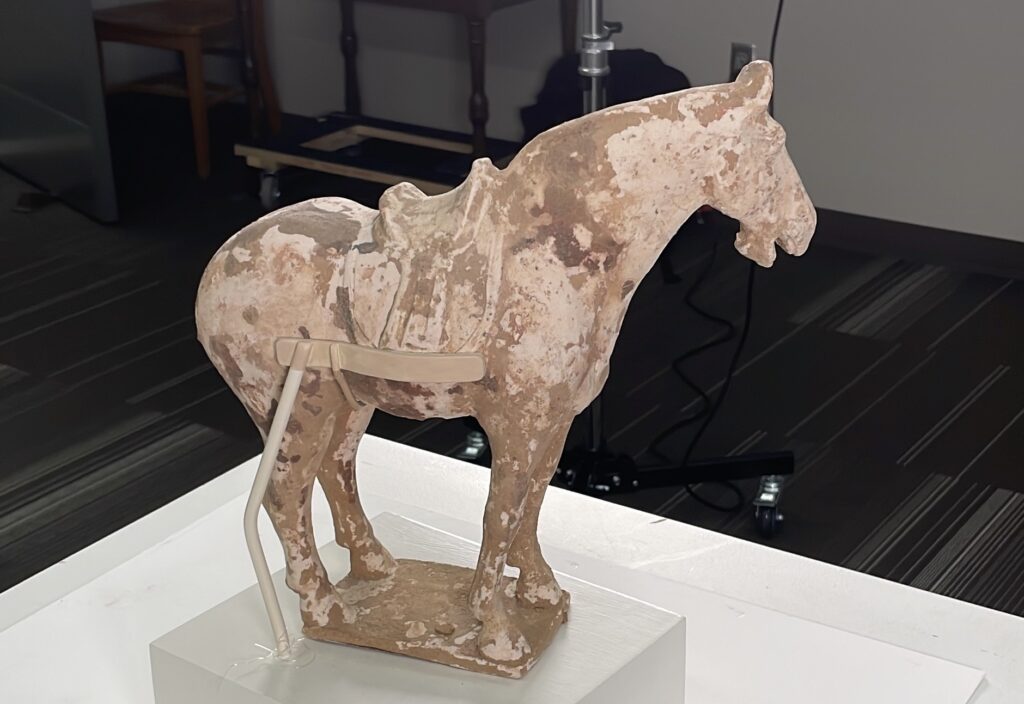
When going into the Weitz to get photos of creating out own model for the Perlman museum, I gained a larger appreciation for the process. I took hundreds of photos from different angles and levels of the horse to make sure all aspects of the horse were covered. What I did not realize was how time consuming it would be, taking these photos and making sure to maintain a consistent lighting for the modeling program. It was only after all this work when I realized that Recap Photo, the 3D modeling software, only allowed 100 photos per object. This did mean we had to be more strategic about what photos to include so that the program could properly create the model. This process has made me grow a stronger appreciation for art and will change how I approach talking and viewing about art in the future.
3 thoughts on “3D Modeling and Photogrammetry”
Comments are closed.
It is a great point that the Smithsonian has an immense collection. This is yet another reason why the online modeling is hugely beneficial that allows everyone to experience the whole collection. However, the online model never quite does the object justice. I agree that making the model gave me a larger appreciation for the artifact and collection as a whole.
I think creating and maintaining and accurate digital collection is really helpful to showcase an entirety of a collection, but like Ben mentioned, the digital models, regardless of how accurate they are can’t quite capture the full essence of a historical object. Its because of this that I think the greatest benefit of digital collections is for providing a way for people to search for and identify objects that may be of use or interest and then have this information to go visit the objects in person.
Haha, we ran into the same problem. We took over 100 photos, so we had choose a few to get rid of. Fortunately our object (a pot) was a lot less complex than your horse. What was also a pain, was converting our images from .heic files to .jpeg files. because we had so many photos we couldn’t use an online converter.